
Disclosure: Pro Video Tips may earn a commission if you buy through links on this page, at no extra cost to you.
Wondershare sometimes calls the perpetual licence a “lifetime” plan. That’s true for the version you buy, not for future versions. Here’s what that means in practice.
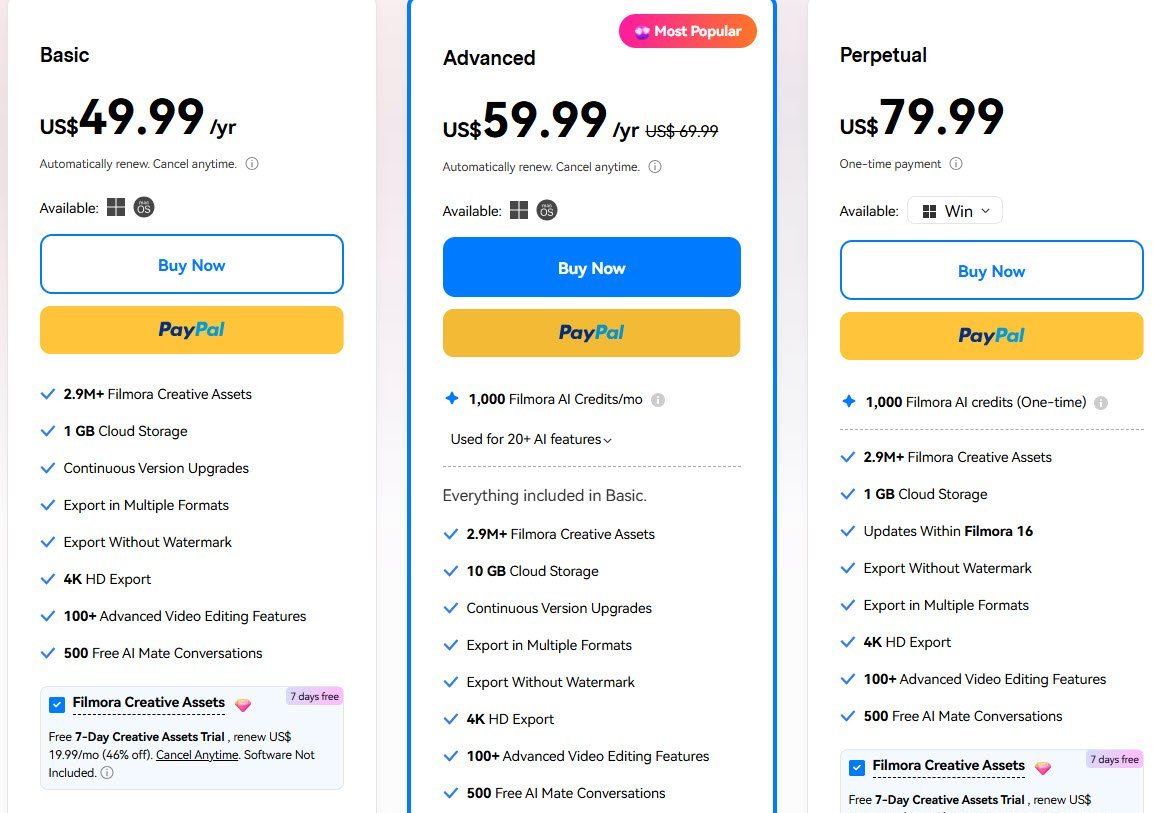
What each option gives you (US shop, as at November 2026)
| Perpetual | Basic annual | Advanced annual | |
|---|---|---|---|
| Price | US$79.99 once | US$49.99/year | US$59.99/year |
| Updates | Updates within Filmora 16 | All new versions while subscribed | All new versions while subscribed |
| AI credits | 1,000 one-time | None | 1,000 per month |
| Cloud storage | 1 GB | 1 GB | 10 GB |
| If you stop paying | Keep using Filmora 16 | Lose paid features | Lose paid features |
Prices are as at November 2026 (official US shop) and change often; check the current price for your country before you buy. Students and teachers can also buy Education plans (US$19.99/month, US$39.99/year or US$49.99 perpetual, as at November 2026).
The key rule
Wondershare’s FAQ explains it simply: an update is a fix or small improvement within a version (16.0 to 16.1); an upgrade is a new major version (16 to 17). Perpetual includes updates, not upgrades. Annual plans include both while active.
When Filmora 16 came out, Wondershare said perpetual owners keep using the version they bought for life, and can move to 16 at a discounted price offered inside the app. Active subscribers moved to 16 at no extra cost.
When perpetual wins
- You edit a few projects a year.
- Filmora 16’s current feature set does what you need.
- You rarely use credit-based AI tools.
- You don’t want a renewal on your card.
When an annual plan wins
- You publish every week and want each new feature as it lands.
- You use AI tools often – Advanced’s 1,000 credits a month are worth far more than the perpetual’s one-time 1,000.
- You would upgrade to every new major version anyway.
Break-even
At today’s prices, two years of Basic (US$99.98) costs more than one perpetual licence (US$79.99). But Wondershare has released a new major version roughly once a year (15 in November 2025, 16 in October 2026), so a perpetual owner who always wants the newest version would pay an upgrade fee each time. If you’d skip versions, perpetual is cheaper. If you wouldn’t, the annual plan is simpler.
Watch out for
- Auto-renewal. Annual plans renew automatically; turn it off in your Wondershare account if you only want one year.
- Regional pricing. These are US prices. Check your local shop for AUD, GBP or EUR pricing and tax.
- Platform. Check whether the licence you’re buying covers Windows, Mac or both before checkout.
- Launch promotions. For the Filmora 16 release, Wondershare is also promoting a launch bonus – a 20% discount, a 30-day free trial and 10 GB of free cloud storage – unlocked through rewards in the app. Treat this as a launch promotion that may end at any time, and check its terms before you rely on it.
- Creative Assets trial. Checkout often adds a Filmora Creative Assets trial (7 days free, then US$19.99/month). Untick it if you do not want that add-on.
Our recommendation
- Hobbyist: Perpetual.
- Regular YouTuber using AI tools: Advanced annual.
- Regular YouTuber not using AI tools: Basic annual.
Next: Compare current Filmora plans · see the full pricing breakdown and Filmora 16 review.
Sources
- Filmora shop, plan comparison and FAQ: https://filmora.wondershare.com/shop/buy/buy-video-editor.html
- Filmora 16 upgrade FAQ: https://support.wondershare.com/how-tos/filmora/is-filmora-16-worth-buying-or-paying-to-upgrade-why-is-it-priced-this-way.html
- What’s New (release dates): https://filmora.wondershare.com/whats-new-in-filmora-video-editor.html
About the author
The Pro Video Tips Team is based in Victoria, Australia, and creates practical Filmora tutorials, software reviews and comparisons. We aim to explain useful features, costs and limitations clearly so readers can choose and use the right editor.