
Disclosure: Pro Video Tips may earn a commission if you buy through links on this page, at no extra cost to you.
Filmora has three paid plans for individuals, separate Education plans, and a free version. The differences come down to three questions: do you want future versions, how much will you use the AI tools, and do you hate subscriptions?
The plans for individuals (official US shop, as at November 2026)
| Free | Basic | Advanced | Perpetual | |
|---|---|---|---|---|
| Price | $0 | US$49.99/year | US$59.99/year (shown reduced from US$69.99) | US$79.99 once |
| Watermark-free export | No | Yes | Yes | Yes |
| Future major versions | – | Yes, while subscribed | Yes, while subscribed | No – updates within Filmora 16 only |
| AI credits | None | None included | 1,000 per month | 1,000, one-time |
| Cloud storage | – | 1 GB | 10 GB | 1 GB |
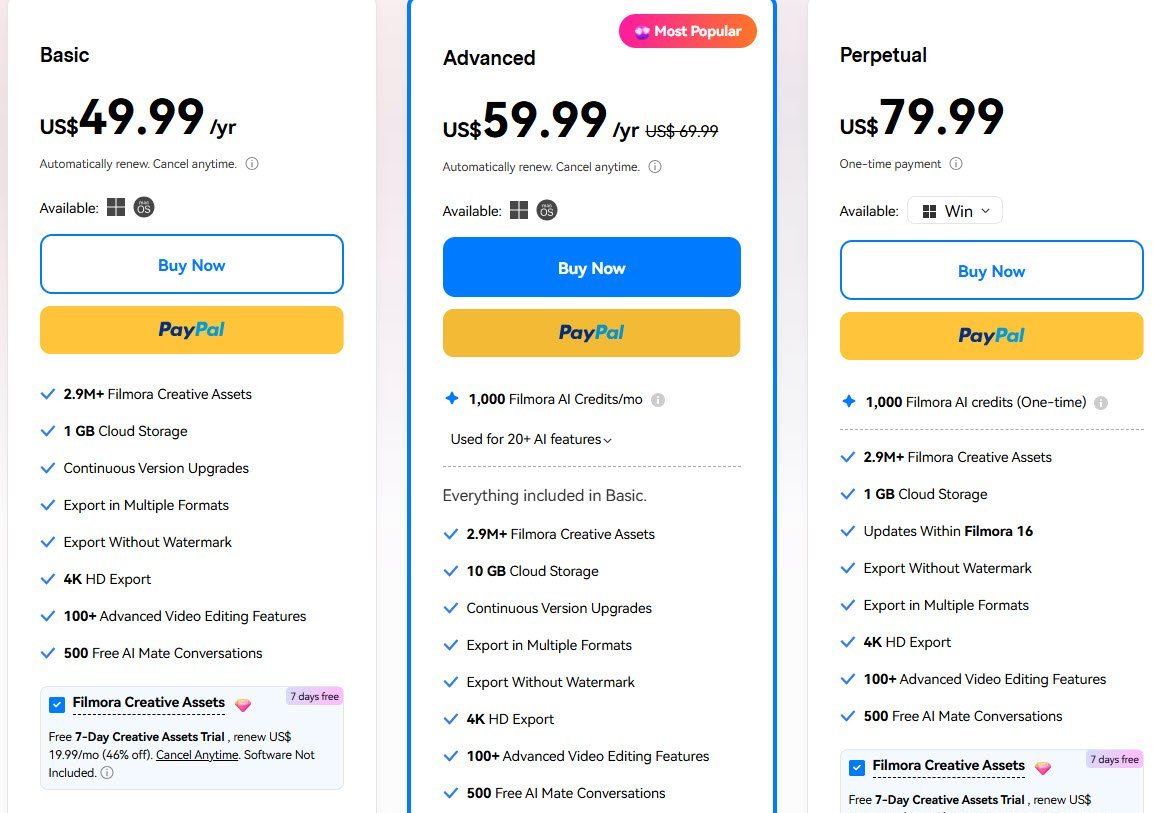
All paid plans include 4K export. Wondershare offers a 30-day money-back guarantee, subject to its refund policy. Prices are as at November 2026 (official US shop) and change often; check the current price for your country before you buy. Regional prices, GST and promotions differ.
Checkout often adds a Filmora Creative Assets trial: 7 days free, then US$19.99/month unless you cancel. It is separate from the editor licence, so untick it if you don’t want it.
For the Filmora 16 release, Wondershare is also promoting a launch bonus – a 20% discount, a 30-day free trial and 10 GB of free cloud storage – unlocked through rewards in the app. Treat this as a launch promotion that may end at any time, and check its terms before you rely on it.

Education pricing
Students and teachers can buy Education plans, which cost less (as at November 2026):
| Education plan | Price | AI credits | Versions |
|---|---|---|---|
| Monthly (1 user) | US$19.99/month | Not included | Upgrades while subscribed |
| Annual (1 user) | US$39.99/year | Not included | Upgrades while subscribed |
| Perpetual (1 PC) | US$49.99 once | 1,000 | Filmora 16 only |
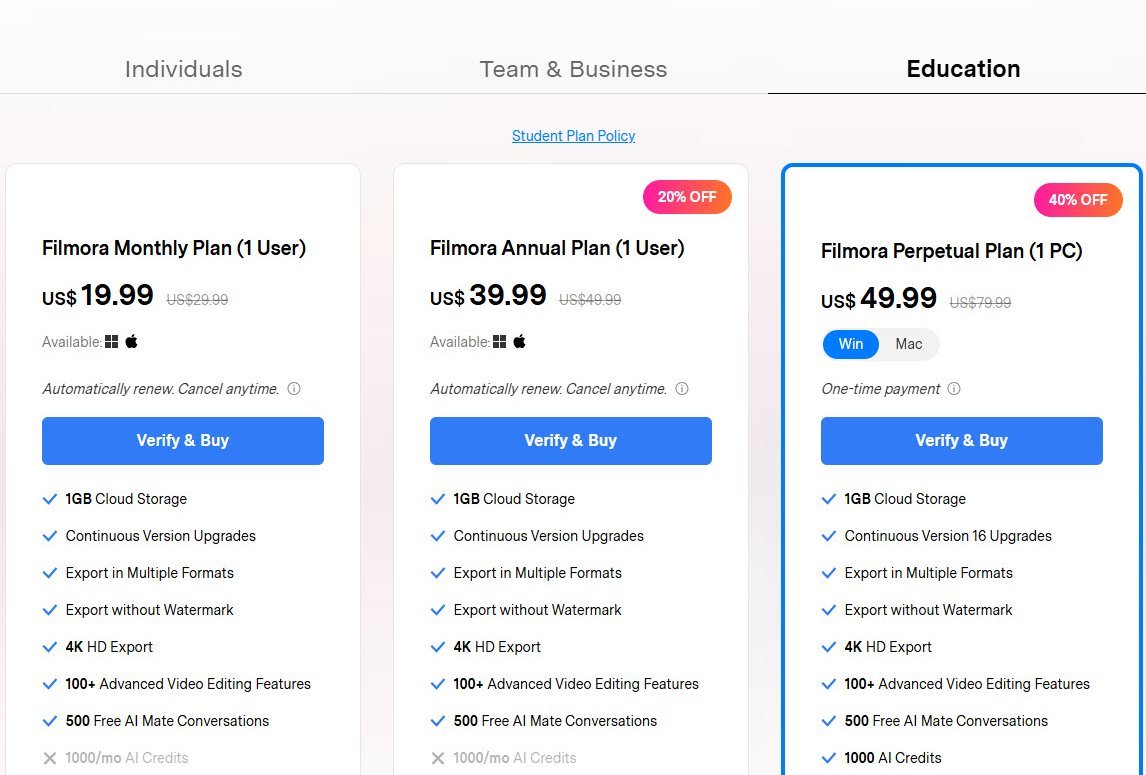
Wondershare asks you to verify eligibility (“Verify & Buy”) under its Student Plan Policy. Check what each Education plan includes before you buy.
How AI credits work
Some Filmora tools are free to use on any plan – for example Auto Reframe, AI Portrait, AI Face Mosaic and AI Color Palette. Many others are “paid by AI credits”, including AI Extend, text-to-video, image-to-video, AI music and sound effects, AI translation, AI Object Remover, AI Video Enhancer, Smart Short Clips and text-based editing.
- Advanced refills 1,000 credits every month.
- Perpetual gives 1,000 credits once.
- Basic includes none, so you buy credits if you need them.
- Unused subscription credits are reclaimed when the next 30-day batch arrives (Wondershare’s plan FAQ).
How many credits a task uses depends on the tool and clip length, and Wondershare shows the cost before you run it. Credit costs change, so check inside the app.
Which plan fits you?
- You edit casually and rarely use AI tools: Perpetual. Pay once, keep Filmora 16.
- You edit every week and want new features: Basic if you don’t need AI tools; Advanced if you do. The jump from Basic to Advanced is about US$10 a year at list price for 1,000 credits a month.
- You’re a student or teacher: look at the Education plans first.
- You only need one project: use the free version to edit, then decide. Remember exports carry a watermark until you pay.
Subscription or perpetual – the three-year view
Using today’s US prices and assuming no price rises:
| Over 3 years (Nov 2026 prices) | Basic | Advanced | Perpetual |
|---|---|---|---|
| Software cost | US$149.97 | US$179.97 | US$79.99 + any paid upgrade to 17 |
| Versions you get | All released | All released | 16 only, unless you upgrade |
| AI credits | Buy as needed | 36,000 | 1,000 |
Wondershare doesn’t publish a fixed price for upgrading a perpetual licence to the next major version; it says existing owners get a discounted price inside the app. More detail in our perpetual vs annual guide.
Is Filmora worth the money?
For a creator who publishes regularly, US$50–60 a year is cheaper than Premiere Pro (US$22.99 a month on an annual plan) and you get a gentler learning curve. If money is the main concern, DaVinci Resolve’s free version has no watermark – see our best free video editors list.
Next: See current Filmora prices and offers · read the full Filmora 16 review.
Sources
- Filmora shop and plan comparison: https://filmora.wondershare.com/shop/buy/buy-video-editor.html
- Filmora 16 upgrade FAQ: https://support.wondershare.com/how-tos/filmora/is-filmora-16-worth-buying-or-paying-to-upgrade-why-is-it-priced-this-way.html
- Adobe Premiere pricing: https://www.adobe.com/products/premiere.html
About the author
The Pro Video Tips Team is based in Victoria, Australia, and creates practical Filmora tutorials, software reviews and comparisons. We aim to explain useful features, costs and limitations clearly so readers can choose and use the right editor.